
Deploy on GitHub Actions
The iron-proxy GitHub Action runs iron-proxy inside your GitHub Actions workflows. It intercepts all outbound HTTP/HTTPS traffic and checks it against a domain allowlist.
Setup
Create an Egress Rules File
Add egress-rules.yaml to your repo root:
domains:
- "registry.npmjs.org"
- "*.npmjs.org"
- "nodejs.org"
- "*.nodejs.org"GitHub Actions infrastructure domains (github.com, *.githubusercontent.com, etc.) are included automatically. You do not need to add them.
Add the Action to Your Workflow
jobs:
build:
runs-on: ubuntu-latest
steps:
- uses: actions/checkout@v4
- uses: ironsh/iron-proxy-action@v1
with:
egress-rules: egress-rules.yaml
warn: true
# Replace with your build/test steps
- run: npm ci
- run: npm test
# Always show the traffic summary, even if earlier steps fail
- uses: ironsh/iron-proxy-action/summary@v1
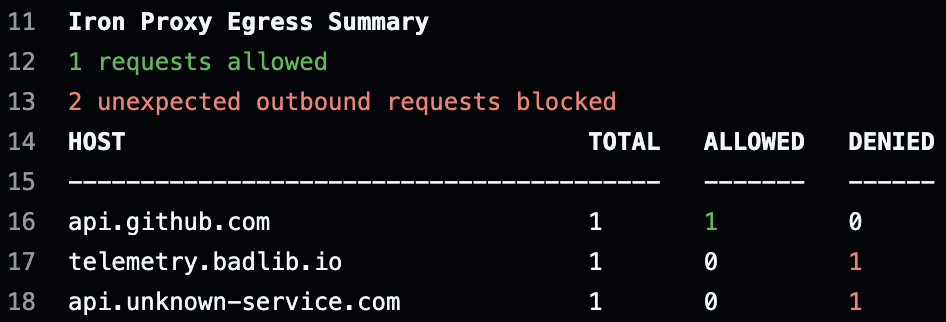
if: always()The ironsh/iron-proxy-action/summary@v1 step prints a table of every domain your job contacted: how many requests were allowed, how many were denied, and where to tighten or loosen your rules.
Review the Summary
After the workflow runs, check the job summary. It shows every endpoint your pipeline attempted to reach and whether the request was allowed or denied.
Rolling Out
Start in warn mode, then switch to enforce mode once your allowlist is dialed in.
- Start with warn mode. Set
warn: trueas shown above. Nothing breaks: all traffic flows through, and denied requests are logged but not blocked. - Check the summary step. It shows every domain your job contacted and whether it would have been allowed or denied.
- Update your allowlist. Add denied domains you expect and trust to
egress-rules.yaml. - Switch to enforce mode. Remove
warn: true(or set it tofalse). Non-allowlisted requests are now blocked.
Egress Rules Format
The egress-rules.yaml file corresponds to the allowlist transform in the full iron-proxy configuration. It supports three types of rules.
Domains
Glob patterns for allowed hostnames. *.example.com matches any subdomain and example.com itself.
domains:
- "api.openai.com"
- "*.anthropic.com"
- "registry.npmjs.org"CIDRs
IP ranges for network-level allowlisting.
cidrs:
- "10.0.0.0/8"Fine-Grained Rules
Rules with method and path restrictions for tighter control.
rules:
- domain: "api.example.com"
methods: ["GET", "POST"]
paths: ["/v1/*"]You can combine all three in a single file:
domains:
- "registry.npmjs.org"
- "*.golang.org"
cidrs:
- "10.0.0.0/8"
rules:
- domain: "api.example.com"
methods: ["GET"]
paths: ["/v1/health"]Action Inputs
| Input | Default | Description |
|---|---|---|
version | latest | iron-proxy version to install |
egress-rules | egress-rules.yaml | Path to your egress rules file |
warn | false | Log denied requests without blocking them |
disable-sudo | true | Revoke sudo so subsequent steps cannot bypass the proxy |
disable-docker | true | Revoke Docker access so subsequent steps cannot bypass the proxy |
upstream-resolver | 8.8.8.8:53 | Upstream DNS resolver |
Summary Action Inputs
| Input | Default | Description |
|---|---|---|
log-file | /var/log/iron-proxy.log | Path to the iron-proxy log file |
show-full-paths | false | Show per-path request breakdown in a collapsible section |
How It Works
The action:
- Downloads and installs iron-proxy
- Generates an ephemeral CA certificate and trusts it system-wide
- Redirects all DNS to the proxy and locks down outbound traffic with iptables
- Revokes sudo and Docker access so subsequent steps cannot bypass the proxy
All outbound HTTP/HTTPS traffic is routed through iron-proxy, which terminates TLS and checks every request against your allowlist before forwarding it upstream.
Security Considerations
The action revokes sudo and Docker access by default. This prevents subsequent workflow steps from modifying iptables rules, DNS config, or running containers that bypass the proxy.
On GitHub-hosted runners, jobs have sudo access, so an attacker who gains code execution before the proxy step can circumvent enforcement. For stronger guarantees, use self-hosted runners with hypervisor-level network controls. Against the common supply chain threats (compromised packages, malicious post-install scripts, rogue build plugins), this action raises the bar considerably.